
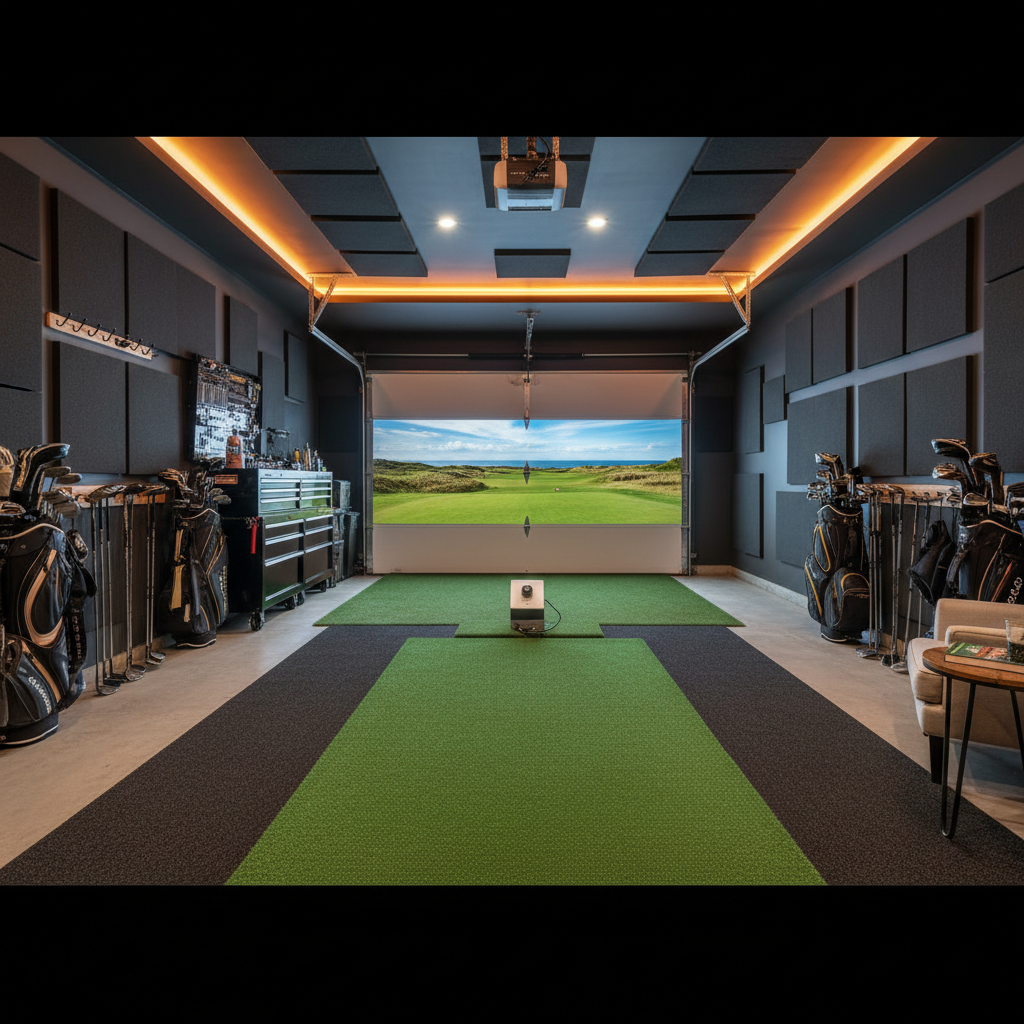
How to Build a Golf Simulator in Your Garage
A step-by-step guide to converting your garage into the ultimate golf simulator room.
Is Your Garage Suitable?
Most two-car garages (20' x 20' or larger) are excellent candidates for golf simulators. The critical measurements are: ceiling height (minimum 9', ideal 10'+), width (minimum 10' for hitting area), and depth (minimum 15' from hitting position to screen). Standard 8' garage ceilings are the most common disqualifier -- measure at the lowest point including any beams or openers.
Single-car garages (10' x 20') can work but feel cramped. You will need to position the screen against the back wall and hit from near the garage door, which limits follow-through space. If this is your only option, consider a retractable net setup that folds when you need to park.
Climate Control Considerations
Garages experience temperature extremes that affect both you and your equipment. In cold climates, insulating the garage door and walls is step one. A mini-split HVAC system ($2,000-$4,000 installed) provides year-round climate control. Alternatively, a space heater works for winter use but does nothing for summer heat.
Humidity matters for electronics. Launch monitors, projectors, and computers should not live in a humid environment long-term. If your area is humid, invest in a dehumidifier or ensure your climate control handles moisture. Most equipment warranties do not cover humidity damage.
Temperature also affects ball behavior. Very cold golf balls compress differently, which can skew launch monitor readings. If your space drops below 50F, warm balls indoors before use for consistent data.
Step 1: Clear and Prep the Space
Remove everything from the simulator zone. You need clear floor space from the hitting mat to the screen, plus 3 feet behind your hitting position for your stance and backswing. Wall-mount or relocate any shelving, bikes, or storage that encroaches on this envelope.
Level the floor if your garage slopes toward the door (most do for drainage). Interlocking foam tiles or a platform with shims can create a level hitting surface. An unlevel floor affects your stance and makes mat placement inconsistent.
Step 2: Install the Enclosure and Screen
Most enclosure kits (Carl's Place, SIG PRO, HomeCourse) are designed for garage installation. You will need to anchor the frame to the ceiling joists and/or walls. Use a stud finder to locate joists, and use appropriate lag bolts or toggle bolts for the weight rating.
Position the screen at least 12 inches from the back wall to allow for screen deflection on impact. A ball hitting a screen that is flush against drywall will damage both the screen and the wall. Leave room for the screen to absorb energy and bounce the ball back.
Hang the screen with even tension across all grommets. Uneven tension creates hotspots where the screen wears faster and affects projected image quality. Most quality screens stretch slightly after initial install, so plan to retension after a week of use.
Step 3: Projector Mounting
Ceiling-mount projectors provide the cleanest setup. Position the projector behind your hitting position, high enough to clear your backswing, angled down toward the screen. Use a projector mount with adjustable arms to dial in the exact angle.
For garages with 9' ceilings, an ultra-short-throw projector mounted just above the screen eliminates shadow and backswing interference entirely. This costs more ($1,500-$3,000) but solves the most common projector frustration in low-ceiling garages.
Run HDMI and power cables through the ceiling or along wall edges with cable raceways. Exposed cables across a garage floor are a tripping hazard and look terrible. Budget $50-$100 for proper cable management.
Step 4: Electrical and Lighting
A golf simulator setup draws 500-1000 watts total (PC + projector + launch monitor + accessories). Most garage circuits can handle this, but verify you are not sharing a circuit with a refrigerator or other high-draw appliance. A dedicated 20-amp circuit is ideal.
Lighting control is critical for projector visibility. Cover any windows with blackout curtains or panels. Replace overhead lights with dimmable LEDs that can be turned off during play but provide enough light for setup and maintenance. Smart bulbs or a dimmer switch work well.
Install a few ambient LED strips behind the screen frame for a polished look. This also provides enough background light to see the ball and mat without washing out the projected image.
Common Garage Mistakes to Avoid
Not accounting for the garage door opener: The motor and rail system often hangs 6-12 inches below the ceiling. Plan your enclosure and projector placement around it, or relocate the opener to the side wall.
Skipping floor protection: Golf swings dig into concrete over time, and dropped clubs chip the surface. A layer of foam tiles or rubber flooring under and around the mat protects both you and the garage floor.
Forgetting about parking: If you still need to park in the garage, design your setup to be partially retractable. Side-folding nets and ceiling-mounted screen systems let you pull in when needed.
Ready to start building?
Get personalized recommendations from our AI advisor or browse our product catalog.